lanpartyut
-
Posts
46 -
Joined
-
Last visited
lanpartyut's Achievements






-
U got pm I want take it
-
 i will take goodrm pro you got pm
 -
3x2GB Patriot Sector 5 2500C9. Asking 50 Euros + shippingBased on PSC X-series. Two best sticks can do 32M at 1333 8-12-8 with 1.92V. i take this one you got pm
-
what a pity
-
i will take gtx2 you got pm
-
hi can you send me you mb's bios file, many thanks
-
nice job
-
test under cold? to make sure the ic just test it or put off the heartslink
-
trident also random with sn 06XX some kits use bbse and another use elpdia oem e die
-
you can have a try 2133 9-11-9 seemd most like psc
-
Kingston HyperX 2133 9-9-9 should be bdbg chips you can test them then Make it easier for them to sell
-
i think on Llano platform elpdia hypers maybe run better,but don not have a test platform
-
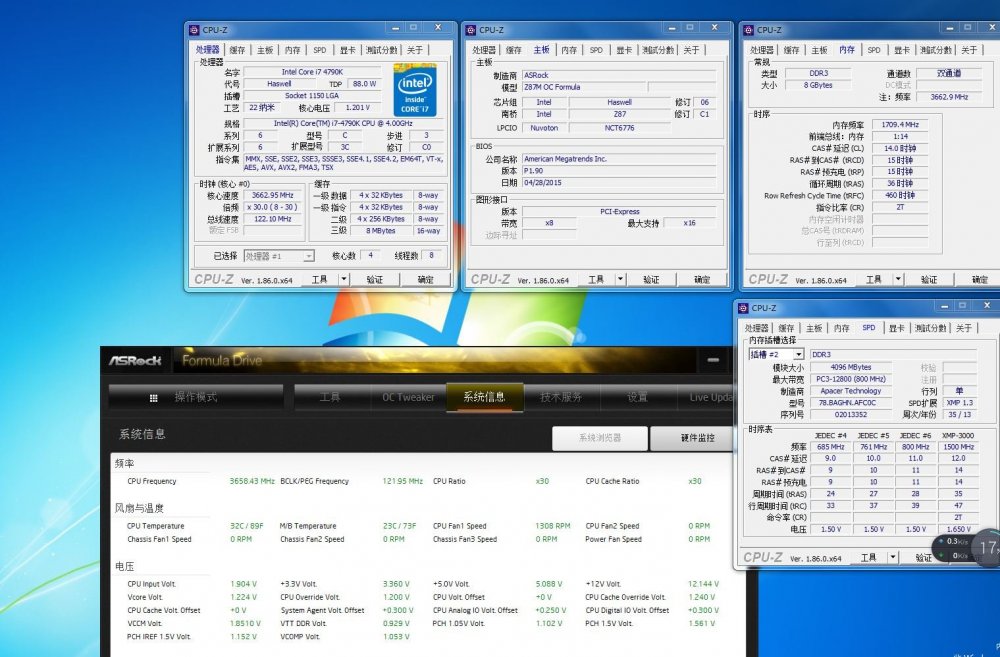
just run 3419 14-15-15 yesterday ,sa+0.3 ioa+0.25 iod+0.3 when I add some bclk then want to go 3500mhz ,cannot boot, even sa+0.35V,maybe my cpu imc limited that will test on another MB to Confirm if imc is restricted this weekend
-
i know System Agent (VCCSA) voltage: 1.15 V to 1.25 V is good ,and what is the safe voltage of them when overcolck on alr