

pipes
-
Posts
117 -
Joined
-
Last visited
pipes's Achievements






-
ASUS ROG MAXIMUS APEX Z790 | APEX 15
pipes replied to noizemaker's topic in Alder Lake (Z690) & Raptor Lake (Z790) OC
There is this guide https://winraid.level1techs.com/t/tool-uefi-editor/91500 Or this: https://winraid.level1techs.com/t/guide-fix-scewin-for-protected-z690-z790-to-easily-modify-hidden-bios-settings/94069 -
ASUS ROG MAXIMUS APEX Z790 | APEX 15
pipes replied to noizemaker's topic in Alder Lake (Z690) & Raptor Lake (Z790) OC
There are guide for enable hidden bios option for all board. Why don't use refind for multiboot? -
ASUS ROG MAXIMUS APEX Z790 | APEX 15
pipes replied to noizemaker's topic in Alder Lake (Z690) & Raptor Lake (Z790) OC
No Avx512 on 13900kf and there is only an option on the apex bios but is no work -
ASUS ROG MAXIMUS APEX Z790 | APEX 15
pipes replied to noizemaker's topic in Alder Lake (Z690) & Raptor Lake (Z790) OC
Avx512 BIOS no work on 13900kf -
ASUS ROG MAXIMUS APEX Z790 | APEX 15
pipes replied to noizemaker's topic in Alder Lake (Z690) & Raptor Lake (Z790) OC
Octool Linux version broken system with kernel panic on libz -
MSI Z490 XOC BIOS/Tools
pipes replied to Wizerty's topic in Comet Lake (Z490) & Rocket Lake (Z590) OC
that menu not work, i have edit the bios for unhidden that menu, there some many options, i have not try all, but memory ed cpu overclock not work -
MSI Z490 XOC BIOS/Tools
pipes replied to Wizerty's topic in Comet Lake (Z490) & Rocket Lake (Z590) OC
Who know or play with this hidden menu?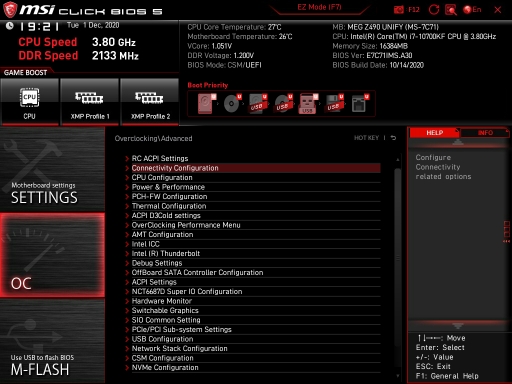
-
I have a new batch of 10700kf, x30f171. 5.2 GHz at 1.325-1.33 but not luck with mem controller then it's not stable with ram at 4.2 cl16. Cache at 47x and 1.030 vccsa. The CPU is comeback from Intel ptpp service
-
msi MSI Z490 MEG Family Test BIOS
pipes replied to Kovan Yang's topic in Comet Lake (Z490) & Rocket Lake (Z590) OC
7c71 is unify here bios site https://www.msi.com/Motherboard/MEG-Z490-UNIFY -
it's available to z270 gaming soc?
-
MSI Z490 XOC BIOS/Tools
pipes replied to Wizerty's topic in Comet Lake (Z490) & Rocket Lake (Z590) OC
in short, the CMD 1t will we have to wait on the next bios version? -
Take error when finish test, data parameter error
-
MSI Z490 XOC BIOS/Tools
pipes replied to Wizerty's topic in Comet Lake (Z490) & Rocket Lake (Z590) OC
i think, this depending on temps, if u run water or air or extreme cooling there are differents -
MSI Z490 XOC BIOS/Tools
pipes replied to Wizerty's topic in Comet Lake (Z490) & Rocket Lake (Z590) OC
In auto I'll seen 1.4~ in auto mode -
MSI Z490 XOC BIOS/Tools
pipes replied to Wizerty's topic in Comet Lake (Z490) & Rocket Lake (Z590) OC
Air cooling? 24/7? How sa and io voltage give leaving in auto?
