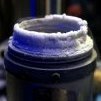
Luumi Posted December 15, 2021 Share Posted December 15, 2021 (edited) I still got my 2nd 7740X here and thought that would be nice to let someone with Apex to try it. Otherwise I might sell the CPU locally. Tested 5.5 Cinebench on water, 5.4 with 1.35v before delid. Problem is cold bug at around -151 on Asrock OCF so I am sure the CPU needs DMI which is only available by default on Apex. Cpu did around 6.6 at that temperature range so I think it is quite good. Retail CPU and runs quite cool at given settings. Edited December 15, 2021 by Luumi 1 Link to comment Share on other sites More sharing options...
Perica_barii Posted December 21, 2021 Share Posted December 21, 2021 price? Link to comment Share on other sites More sharing options...
Recommended Posts