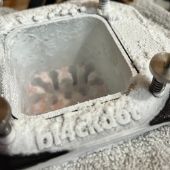
bl4ckdot Posted March 25, 2022 Share Posted March 25, 2022 (edited) Hello, As the title suggest, I'm selling my highly binned retail 12900K (with box). SP101 (110/85). Batch v135 (AVX 512 capable). Will pass any benchmarks at 5.5Ghz at 1.35v set on Unify-X with chilled water ( around 3°). DDR4 IMC : 4300G1 SR DDR5 IMC : since I unfortunately can't do more than 7000mbps with my UX, it had no trouble doing 7000c26 but I can't say much about the max freq. Doesn't need high voltage on IMC. I daily 6800c28 with 1.25 VDD2 and 1.25 CPU VDDQ. Currently use with Velocity² WB which shouldn't bend it. The CPU is NOT delidded and NOT lapped. All of my hwbots sub are with that CPU if you wanna check them out. Price : 1300€ (bank transfert / paypal f&f) + shipping. Not firm, but also not looking to let this one go cheap. Will ship from France with your desired method of shipping. Edited March 25, 2022 by bl4ckdot 3 Link to comment Share on other sites More sharing options...
bl4ckdot Posted March 25, 2022 Author Share Posted March 25, 2022 Edit : sold on discord 1 1 Link to comment Share on other sites More sharing options...
Recommended Posts