.png.858ecb63f68db41fd6777670f1504e5a.png)
Mr. Fox
-
Posts
162 -
Joined
-
Days Won
3
1 Follower
Recent Profile Visitors
.thumb.jpg.a9c08a21b01052c0429a5ff2a05dc711.jpg)

.thumb.jpeg.af9aa53178682f9b2608d874dcb04f2f.jpeg)


Mr. Fox's Achievements






-
.thumb.png.ee983b9a8b58283a5664f2b21968cdf5.png)
Intel opencl versions and performance in GPUPI 3.2
Mr. Fox replied to a topic in HWBOT Software and Apps
No, I am sorry I only have those two versions saved. Intel has a bad practice of taking down old versions of drivers when they are replaced by newer versions and I was lucky to have saved those versions because they are difficult to find. They do the same thing with XTU and there are some older CPUs that only work correctly with older versions of XTU. -
Intel opencl versions and performance in GPUPI 3.2
Mr. Fox replied to a topic in HWBOT Software and Apps
In case anyone needs it, here is also OpenCL v16.1 x64 opencl_runtime_16.1.1_x64_setup -
Intel opencl versions and performance in GPUPI 3.2
Mr. Fox replied to a topic in HWBOT Software and Apps
I uploaded it to my OneDrive for anyone that needs it. Should allow download without sign-in. opencl_runtime_18.1_x64_setup -
snakeeyes - DDR5 SDRAM - 5371 MHz Memory Frequency
Mr. Fox replied to exaberries's topic in Result Discussions
awesome stuff -
ASUS ROG MAXIMUS APEX Z790 | APEX 15
Mr. Fox replied to noizemaker's topic in Alder Lake (Z690) & Raptor Lake (Z790) OC
Strange code to see... it is gnerally related to memory.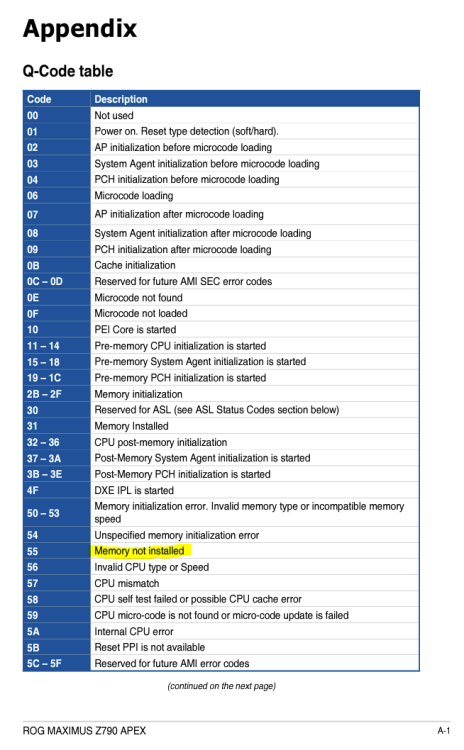
-
Review: TeamGroup T-FORCE XTREEM DDR5 8000c38
Mr. Fox replied to LiquifyMods's topic in User reviews
Sorry for the delayed reply. I just now saw your post. Here is my TeamGroup Xtreem 48GB 8200 kit bumped to 8400. Good latency numbers. The high temps were before I removed the heatsinks and install the waterblocks. -
Raiderman - Ryzen 9 7950X @ 5628MHz - 233876 MIPS 7-Zip
Mr. Fox posted a topic in Result Discussions
Nice run -
Review: TeamGroup T-FORCE XTREEM DDR5 8000c38
Mr. Fox replied to LiquifyMods's topic in User reviews
Sure. I appreciate you taking the time to provide the review. I edited my post above because my initial choice of words was not clear. The 32GB kit you did the review on are indeed A-die. The 48GB kits are the second variation of M-die (came after A-die, which came after the first M-die). In general, the second variation of M-die used on the 24GB modules overclocks higher than the A-die and requires less voltage than the A-die. -
Review: TeamGroup T-FORCE XTREEM DDR5 8000c38
Mr. Fox replied to LiquifyMods's topic in User reviews
Thanks for the review. I agree that these are nice modules. The 2x24GB kit is much better than the 32GB (2x16GB) A-die Xtreem 8000 kit. I purchased that initially and returned it for a refund. It was not nearly as good as the 48GB kit. I have the 8200 kit and these are the second variation of Hynix M-die. I did not take pictures of the IC after removing the heatsinks to install the waterblocks, but it is clearly printed on them. Removing the heatsinks was very easy using acetone to melt the adhesives. If you soak the modules for about 10 minutes the adhesives will turn loose and allow you to separate the heatsinks from the modules without using force. The foam pad and the thermal pad will be left intact. The round silver medalion has pins that align with holes in the metal, so don't try to pry off the medalion by itself. Gentle force lifting the heatsink off of the module will peel the medalion away from the upper portion of the heatsink without breaking the medalion. -
Awesome job, brother.
-
ASUS ROG MAXIMUS APEX Z790 | APEX 15
Mr. Fox replied to noizemaker's topic in Alder Lake (Z690) & Raptor Lake (Z790) OC
Thank you. I will check them out. -
ASUS ROG MAXIMUS APEX Z790 | APEX 15
Mr. Fox replied to noizemaker's topic in Alder Lake (Z690) & Raptor Lake (Z790) OC
I prefer the option to choose the bootloader from the firmware menu and have each OS use its own bootloader. Refind works very well, but I just like choosing it from firmware before anything else is loaded. I you would be kind enough to point me in the right direction how to enable hidden menus in the ASUS BIOS that would be appreciated. -
Could you be more specific? Are you talking about the calculation of points, the benchmark submission process being broken, or something else?
-
ASUS ROG MAXIMUS APEX Z790 | APEX 15
Mr. Fox replied to noizemaker's topic in Alder Lake (Z690) & Raptor Lake (Z790) OC
I wish we could have a BIOS for the Apex that allows us to disable Intel ME and the option to toggle the boot priority menu at POST (both features on the EVGA Dark mobos that I absolutely love and use 100% of the time). Does anyone here know how to mod the firmware to add those missing valuable feature that ASUS conveniently omits? I always multi-boot all of my computers and having the POST process halt and wait for me to select a drive to boot from is way better than having to spam the F8 key. -
ASUS ROG MAXIMUS APEX Z790 | APEX 15
Mr. Fox replied to noizemaker's topic in Alder Lake (Z690) & Raptor Lake (Z790) OC
I just checked and it looks like an updated version is available. I had 3.3m (which did not work) but just downloaded 3.3p to test. I have the Pro version so I didn't have to purchase the new release. No GPU drivers are needed for CPU benchmarks, so there is still a valid use for Windows 7 for benching. I wish someone with the knowledge and skill would do a driver mod to support 40-series RTX GPUs on Windows 7. Edit: the Flashboot v3.3p worked perfectly to install Windows 7 in UEFI (no CSM) on the Z690 Dark.