Matt26LFC Posted April 7, 2020 Share Posted April 7, 2020 Strong stuff matey! I may have to wait for 10c20t comet lake to arrive before I bother challenging lol 1 Quote Link to comment Share on other sites More sharing options...
chispy Posted April 7, 2020 Share Posted April 7, 2020 Thank you my old friend Matt , appreciate it the kind nice words. It took me way longer than usual for this score , it's was not easy passing Nazar score. Quote Link to comment Share on other sites More sharing options...
shar00750 Posted April 7, 2020 Share Posted April 7, 2020 Great one ? 1 Quote Link to comment Share on other sites More sharing options...
Vipp3r Posted April 7, 2020 Share Posted April 7, 2020 Good job mate! 1 Quote Link to comment Share on other sites More sharing options...
chispy Posted April 7, 2020 Share Posted April 7, 2020 Thank you Sharon and Vipp3r. 1 Quote Link to comment Share on other sites More sharing options...
mllrkllr88 Posted April 7, 2020 Share Posted April 7, 2020 BOOM Water gold, best kind :D 1 Quote Link to comment Share on other sites More sharing options...
chispy Posted April 8, 2020 Share Posted April 8, 2020 Thank you Miller . In house lock down 24/7 quarantine has made re bench most of my old video cards again , it helps as the time go by easier. Quote Link to comment Share on other sites More sharing options...
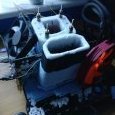
Mythical tech Posted April 8, 2020 Share Posted April 8, 2020 Nice job! Got any pictures of the setup? Quote Link to comment Share on other sites More sharing options...
Recommended Posts
Join the conversation
You can post now and register later. If you have an account, sign in now to post with your account.