Crew Don_Dan Posted April 2, 2012 Crew Share Posted April 2, 2012 You did it! Congrats! Quote Link to comment Share on other sites More sharing options...
Mafio Posted April 2, 2012 Share Posted April 2, 2012 woooow keep up the good work honda Quote Link to comment Share on other sites More sharing options...
Eeky NoX Posted April 2, 2012 Share Posted April 2, 2012 Bugged result !! Wrong devider!! 1/2?? wtf? Lol joking Honda you know it Great job with my beloved board. Which sticks you used and how much vDimm plz? D9gmh over 2.6v? Quote Link to comment Share on other sites More sharing options...
jjjc Posted April 2, 2012 Share Posted April 2, 2012 Great work man! Quote Link to comment Share on other sites More sharing options...
Hondacity Posted April 2, 2012 Share Posted April 2, 2012 this is a very disappointing run lol. past 400 its almost impossible. nb 1.64 @ -90c vdimm 3v @ -184 cpu @ -90c Quote Link to comment Share on other sites More sharing options...
Eeky NoX Posted April 2, 2012 Share Posted April 2, 2012 Woosh! 1.64 vNB for 400fsb right Frozen stick ok but which one is it mate? I need to give a shot too... but with SS on one CL6 stick this time. Only pushed 714 dual channel CL5 last seesion. Quote Link to comment Share on other sites More sharing options...
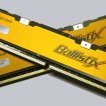
Hondacity Posted April 2, 2012 Share Posted April 2, 2012 its crucial ballistix 800 cl4 2x1gb vnb 1.8v also ok with frozen nb lol Quote Link to comment Share on other sites More sharing options...
K404 Posted April 2, 2012 Share Posted April 2, 2012 Nice work My attempt at 800MHz ended with 788MHz and a dead board I am envious! Quote Link to comment Share on other sites More sharing options...
Hondacity Posted April 2, 2012 Share Posted April 2, 2012 its not number1 bro lol. i want to see 900+ i'll try the backup board. Quote Link to comment Share on other sites More sharing options...
George_o/c Posted April 2, 2012 Share Posted April 2, 2012 Nice one man Quote Link to comment Share on other sites More sharing options...
TaPaKaH Posted April 2, 2012 Share Posted April 2, 2012 stock or tweaked mchbar? Quote Link to comment Share on other sites More sharing options...
Hondacity Posted April 2, 2012 Share Posted April 2, 2012 Stock bios. I dunno how to unlock mchbar. Maybe that's the missing piece. Quote Link to comment Share on other sites More sharing options...
TaPaKaH Posted April 2, 2012 Share Posted April 2, 2012 PMem -> FED14030 -> adjust Quote Link to comment Share on other sites More sharing options...
SteveRo Posted April 2, 2012 Share Posted April 2, 2012 Wow - great work Mr. Honda! Quote Link to comment Share on other sites More sharing options...
Hondacity Posted April 3, 2012 Share Posted April 3, 2012 @Sambo Thanks will try that @all comments thanks but I'm not happy hahahahha Quote Link to comment Share on other sites More sharing options...
Blackbolt Posted April 3, 2012 Share Posted April 3, 2012 Nice Hondacity;) Quote Link to comment Share on other sites More sharing options...
l0ud_sil3nc3 Posted April 3, 2012 Share Posted April 3, 2012 love seeing these clocks on DDR2:) Quote Link to comment Share on other sites More sharing options...
Recommended Posts
Join the conversation
You can post now and register later. If you have an account, sign in now to post with your account.