mllrkllr88 Posted August 27, 2019 Share Posted August 27, 2019 Awesome man!! Congratulations ? Quote Link to comment Share on other sites More sharing options...
GtiJason Posted August 27, 2019 Share Posted August 27, 2019 Yeah Buddy ! Quote Link to comment Share on other sites More sharing options...
funsoul Posted August 27, 2019 Share Posted August 27, 2019 Fantastic shot Pankil! Great job! Quote Link to comment Share on other sites More sharing options...
Noxinite Posted August 27, 2019 Share Posted August 27, 2019 Nice score, but we want rig pics! :D Quote Link to comment Share on other sites More sharing options...
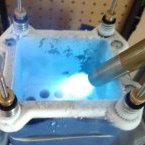
richiec77 Posted August 27, 2019 Share Posted August 27, 2019 Remind me to upload the picture of him pouring LN2 with a 1 Gallon (3.8L) growler/thermos. 2 Quote Link to comment Share on other sites More sharing options...
aerotracks Posted August 27, 2019 Share Posted August 27, 2019 Well deserved hardware gold! Quote Link to comment Share on other sites More sharing options...
Bones Posted August 27, 2019 Share Posted August 27, 2019 Killer run man! Quote Link to comment Share on other sites More sharing options...
bigblock990 Posted August 27, 2019 Share Posted August 27, 2019 Good job! Quote Link to comment Share on other sites More sharing options...
Samsarulz Posted August 27, 2019 Share Posted August 27, 2019 Great job RT Quote Link to comment Share on other sites More sharing options...
sexpot Posted August 27, 2019 Share Posted August 27, 2019 Great results, congrats! I had a 580 Hydrocopper back in Sandybridge days and it was a gem of a clocker. Quote Link to comment Share on other sites More sharing options...
richiec77 Posted August 27, 2019 Share Posted August 27, 2019 (edited) Done. Only thing better would have been to drag a tank to the GPU and put the transfer hose in. Edited August 27, 2019 by richiec77 1 2 Quote Link to comment Share on other sites More sharing options...
rtsurfer Posted August 27, 2019 Share Posted August 27, 2019 (edited) Thanks Gents!!! 3 hours ago, richiec77 said: Done. Only thing better would have been to drag a tank to the GPU and put the transfer hose in. Lol. You really did it. Here you go @Noxinite . Rig pic. ? Edited August 27, 2019 by rtsurfer 3 Quote Link to comment Share on other sites More sharing options...
richiec77 Posted August 28, 2019 Share Posted August 28, 2019 "It runs the benchmark or it gets the hose again" 2 Quote Link to comment Share on other sites More sharing options...
Recommended Posts
Join the conversation
You can post now and register later. If you have an account, sign in now to post with your account.